One of the most time-consuming jobs on site is collecting timesheets and turning them into payroll. In FYPAN, timesheets are entered daily, accumulate through the month, and payroll is calculated in one click at month end. This guide walks through the flow from daily entry to payroll.
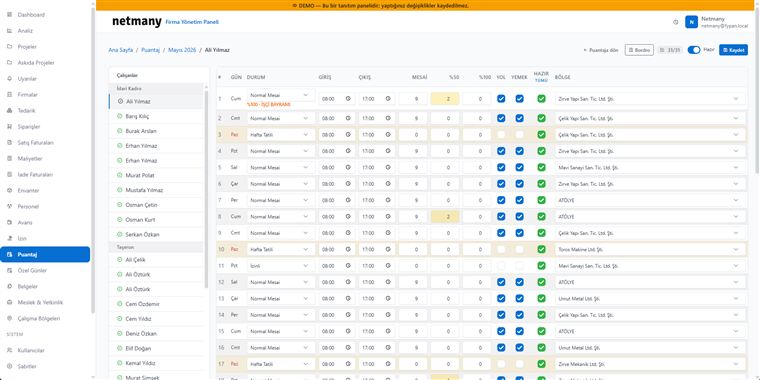
In the Timesheet module, select the relevant month. Registered employees are grouped as office staff and subcontractors; you can open each employee’s monthly card for that month. Add active employees from the list, and define passive (departed) staff when needed.

For each day, choose the status: normal shift, weekend, or leave. Clock-in/out times, overtime (50% / 100%), transport and meal entitlements, and the work zone are all recorded in one row. Public holidays and special days apply automatically; marking a day “ready” counts it as completed.
The daily meal allowance comes from settings and can be updated per month in the panel. The month’s special days (holidays, public holidays) and the applied percentages are listed in a separate box; the payroll calculation takes them into account.
When the month is complete, Payroll calculates the employee’s earnings automatically: normal shift, overtime, transport, meal, and advance/leave deductions are evaluated together. Lock the month to close it to later changes.
If you’d like to see the timesheet-to-payroll flow with your own staff structure, let us set up a custom demo.